

To thrive in a dynamic manufacturing landscape, it’s essential to visualize work processes clearly and improve them continuously. And a Kanban board helps with just that. With this powerful visual tool, you can spot and address problematic work stages quickly, limit work in progress (WIP), collaborate smoothly, and improve efficiency.
The roots of Kanban boards lie in the Kanban method originally developed by Taiichi Ohno for Toyota. Back then, to control the movement of parts along the supply chain, Ohno used Kanban cards as a visual cue. And after a few decades, the Kanban board came to life. Today, it’s among the most popular visual management tools used in manufacturing.
This article dives into the nuances of Kanban boards, their benefits, and implementation.
What Is a Kanban Board?
Typically, a Kanban board can be something as simple as a large whiteboard with sticky notes or cards (representing work items) arranged in columns. And the columns indicate the specific steps of a work process, from start to end.
Also, Kanban cards are like visual signals that help align production with demand, thus reducing waste and preventing excess inventory from piling up. How? When a process step requires more items to satisfy demand, it pulls the relevant card to alert the previous step that production needs to be increased.
Here’s a closer look at the different components of a Kanban board:
- Cards
These represent tasks visually and include detailed information like status, description, assignee, deadline, etc. Usually, cards of different colors are used to indicate different work items. In each column, these cards appear in an order that reflects their relative priority. The most urgent cards or tasks are at the top.
- Columns
Every column stands for a specific stage of the workflow. Kanban cards are moved left to right through the columns as the work progresses, until completion.
- WIP Limits
In various workflow stages, these limits restrict the maximum number of tasks. By limiting WIP, you can complete work items quickly since your team gets to focus only on the tasks at hand.
- Swimlanes
These horizontal lanes help you separate different teams, services, activities, and more on the same Kanban board.
- Commitment Point
This refers to a point in the process where an item of work is all set to be pulled into the workstream. In other words, your team is ready to work on the item.
- Delivery Point
This particular point in the workflow indicates that work items are finished and ready to be delivered.
There are many reasons why Kanban boards have earned a special place in lean manufacturing and are widely used in factories. For instance, besides facilitating visual management, these boards help optimize workflows and minimize waste. Plus, they help enhance product quality and also build a continuous improvement culture.
Let’s explore the benefits of these boards further in the next section.
Benefits of a Kanban Board for the Shop Floor
Kanban boards help in building competitive advantage and enable your team to achieve more, rapidly. So, these are the key benefits of implementing such a board on the shop floor:
- Improved Visibility
Everyone can instantly and clearly visualize the movement of tasks. This means, spotting bottlenecks early on becomes easy.
- Greater Efficiency
Kanban boards help enhance flow efficiency without managers having to stretch the budget or devote extra resources for problem-solving. This is because process visualization quickly highlights inefficiencies like excessive WIP, bottlenecks, etc.
- More Productivity
Increased productivity is a direct result of enhanced efficiency. Tasks move faster through a process and more of them get completed.
- Overburdening Prevented
Conventional management methods involve upfront planning, after which the work is pushed on to the team even if they don’t have enough bandwidth. But with Kanban, teams pull tasks into the workflow as per their capacity. Also, each process state has a WIP limit. Once that limit is hit, new tasks cannot enter that particular state unless a current task leaves.
- Better Focus
Owing to WIP limits, at a time, team members concentrate on a single task. They don’t have to split their attention across multiple tasks.
- Less Waste
Actions that don’t add value (something customers want to pay for) and aren’t essential for manufacturing quality products but utilize resources are deemed as waste. Eliminating such actions is essential for optimizing processes. And Kanban helps by minimizing waiting time.
- Flexibility
Flexible business processes help you survive in a market that’s constantly fluctuating and respond to demand changes quickly. With Kanban, managers can reassess priorities based on market changes, which isn’t possible with an inflexible general project plan.
- Enhanced Collaboration
Collaboration among all team members, from frontline workers to decision-makers, improves. Kanban meetings empower various stakeholders to share opinions, exchange information, and brainstorm solutions together.
- Better Company Culture
Effective collaboration makes your company more inclusive and boosts stakeholders’ morale. Team members take initiative, think creatively, and focus on improving productivity, quality, and customer satisfaction continually. Consequently, you embrace a continuous improvement culture.
When to Use a Kanban Board in Your Manufacturing Plant
It’s ideal to use a Kanban board when you want to:
- Remove Bottlenecks
Kanban precisely highlights where work is piling up or the flow is stopping. From start to finish, you can visualize every step and spot and resolve delays.
- Make Production Predictable
Kanban boards help stabilize output fluctuations. With WIP limits, you prevent one workstation from getting overloaded while another stays idle.
- Address Frequent Material Shortages
Does work stop frequently because your teams run out of materials? Before stocks get exhausted, Kanban cards can trigger reorders and avoid downtime.
- Strengthen Communication
Kanban boards eliminate the need to share verbal updates or exchange emails. All stakeholders see what’s happening on a shared space.
- Implement Lean Manufacturing
You can adopt lean principles like continuous flow, just-in-time production, and waste reduction. By flagging inefficiencies and facilitating daily problem-solving, Kanban boards foster continuous improvement.
- Enhance Scheduling Visibility
Since Kanban boards display real-time process progress, managers don’t struggle to track the status or completion times of jobs. You can even make live data-backed decisions with digital boards.
- Minimize Excess Inventory
With Kanban, work in a certain stage starts only when the next stage requires the same. This helps reduce material waste, excess production, and the cost of holding inventory.
- Standardize Work
You can run multiple shifts seamlessly as Kanban boards keep everyone on the same page. Handovers aren’t confusing and there is no downtime since everyone is aware of the work status.
- Improve Accountability
Kanban boards allow everyone to see who is working on what, where delays are happening, etc. And this performance transparency translates to better ownership.
How to Implement a Kanban Board in 8 Steps
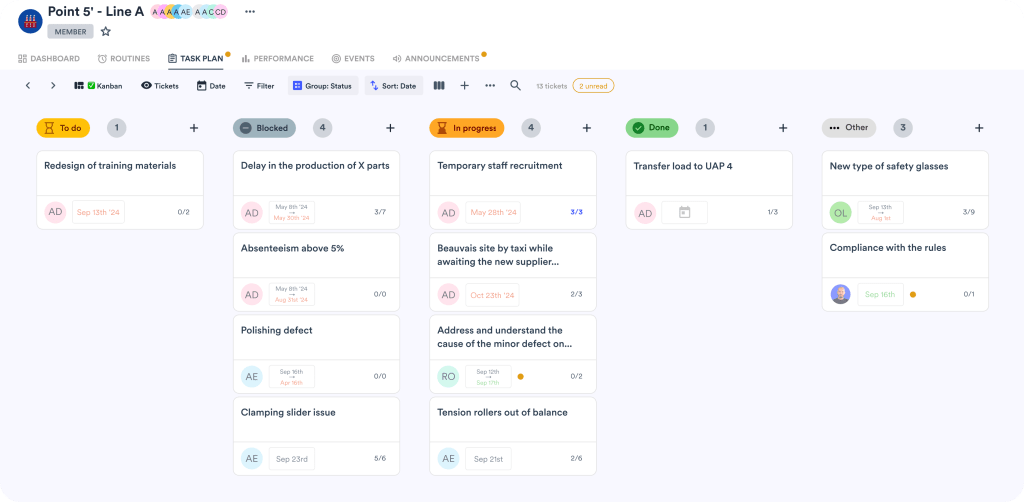
Here’s how you can implement a Kanban board efficiently:
- Study the Production Process
Walk around the factory floor and note every step that goes into manufacturing a product. These steps will become your Kanban board’s columns later.
- Create the Kanban Board
You can take the traditional route by picking a whiteboard and posting Kanban cards or sticky notes on it. However, if your business is into digital transformation, choose a digital board and reap benefits like accessibility, flexibility, and adaptability. Either way, for every work stage, label the columns and use cards to indicate materials, batches or individual orders.
- Visualize the Work
On every card, mention a production job along with details like due date, quantity, etc. Position the cards in the appropriate column. As work progresses, move the cards to the next columns. This will help everyone understand what’s yet to start, in progress, or finished.
- Limit WIP
To keep production balanced, in each column on the board, set a maximum number of jobs. Avoid overloading a single process step.
- Add Clear and Simple Rules
For instance, a rule can say that when a card is empty, it’s a sign to start new production. You can also make rules on when cards should be moved or what steps to take if someone gets stuck on a job. Ensure these rules are near the Kanban board, so everyone can comply.
- Start Small
Before implementing a Kanban board factory-wide, pick a particular work area or product line and test the system. For a few weeks, run it and make observations. If something’s not working, like WIP limits, column names, or details on cards, make adjustments.
- Review Every Day
Conduct short meetings near the Kanban board daily and review progress, as in what’s stuck and what’s moving. Assign team members who can resolve bottlenecks or unclog the workflow. Update the board afterwards.
- Improve with Data
After running the system for a while, track bottlenecks (where work is piling up), lead time (time taken by jobs), quality issues, and missed deadlines. Leverage the data to make necessary process adjustments.
Building a Culture of Visual Flow and Efficiency
Implementing Kanban boards is one of the best ways to make every process stage, task, and bottleneck visible to all. The resultant transparency fosters accountability, facilitates fast problem-solving, and drives collaboration. Over time, you reap other benefits like enhanced efficiency, productivity, flexibility, and a lean and continuous improvement culture.
Still need a special edge? Consider using digital boards and enjoy remote accessibility, updates in real time, and performance analytics. fabriq also helps you track workflow metrics instantly, prioritize tasks dynamically, reduce downtime, and make production predictable.
Explore how Kanban boards in fabriq can help you visualize workflows, reduce waste, and create a culture of continuous improvement today.
