

SQCDP boards are a familiar sight in manufacturing. SQCDP in practice gives frontline teams a simple visual way to review Safety, Quality, Cost, Delivery and People performance and quickly identify where attention is needed.
But putting an SQCDP board on the shop floor does not automatically create an effective daily management system. The real value comes from what happens around the board: teams review the right KPIs, discuss deviations, assign actions, escalate problems and follow through until they are resolved.
As manufacturing operations become more connected and span multiple lines, shifts and plants, traditional whiteboards can make those workflows difficult to scale. Digital SQCDP brings performance data, meetings, issues and actions together, helping manufacturers turn visual management into a more connected daily operating rhythm.
Let’s look at what SQCDP looks like in practice, how physical and digital SQCDP boards compare, how to run effective meetings, and how manufacturers can digitize SQCDP as part of a broader Daily Management System (DMS).
What Does SQCDP Look Like in Practice?
SQCDP is a visual management framework used by manufacturing teams to monitor Safety, Quality, Cost, Delivery and People performance and take action when results deviate from expectations.
The exact metrics vary by organization and even by operational tier. A production team may review very granular shift-level measures, while plant leadership may monitor aggregated KPIs and systemic issues.
For example, some key KPIs that an SQCDP board might include are:
| SQCDP area | Example manufacturing KPIs |
| Safety | Incidents, near misses, days without an accident |
| Quality | Defects, scrap, rework, first-pass yield |
| Cost | Scrap costs, overtime, production costs |
| Delivery | On-time delivery, schedule attainment, backlog |
| People | Absenteeism, staffing, training, skills gaps |
However, the purpose isn’t simply to report these numbers.
Imagine a production team begins its morning meeting and sees that yesterday’s quality performance is red. The team identifies that a specific line experienced an unusual increase in defects.
Effective SQCDP should help them move from identifying a KPI deviation and uncovering the root cause to assigning a responsible owner to an action. Then, ultimately leading to resolving the issue.
That’s the difference between an SQCDP dashboard and SQCDP as a daily management practice.
If you’re new to the methodology itself, our guide to the SQCDP board covers the fundamentals in more detail.
Physical vs. Digital SQCDP Boards: What’s the Difference?
Physical SQCDP boards have supported Lean manufacturing for decades—and for good reason.
A whiteboard is highly visible, easy to understand and located where the work happens. Teams can gather around it, update results and immediately see whether performance is on target.
For a single team or production area, that simplicity can be powerful. The challenge appears as the daily management process becomes more complex.
A KPI may already exist in an ERP, MES or Power BI dashboard, yet someone still needs to copy it onto a whiteboard. An issue identified during the morning meeting may need to be communicated to another department by email. An action might be written on the board but become difficult to follow once the shift changes.
And when a plant manager wants to understand what is happening across ten teams, or a COO across ten plants, the limitations become even more apparent.
Digital SQCDP addresses these gaps without changing the fundamental purpose of the methodology.
| Capability | Physical SQCDP | Digital SQCDP |
| Visual KPI management | ✓ | ✓ |
| Frontline visibility | ✓ | ✓ |
| Automatic KPI updates | — | ✓ |
| Historical performance | Limited | ✓ |
| Action tracking | Manual | ✓ |
| Issue ownership | Manual | ✓ |
| Automated escalation | — | ✓ |
| Cross-shift visibility | Limited | ✓ |
| Multi-site visibility | — | ✓ |
| Integration with existing data | — | ✓ |
The goal therefore shouldn’t be to digitize SQCDP because digital is inherently better than physical.
Digitization becomes valuable when manufacturers need to connect SQCDP with a wider operating system: existing data, multiple meetings, action management, escalation and visibility across different organizational tiers.
For example, if your manufacturing KPIs already live in Power BI, digital daily management can connect that performance information with the routines used to respond to it. Instead of creating another isolated dashboard, the objective is to close the gap between seeing a problem and managing its resolution.
How to Run an Effective SQCDP Meeting in 5 Simple Steps
An effective SQCDP meeting should be short, structured and focused on exceptions. The purpose isn’t to discuss every KPI in detail. It’s to understand where performance differs from the expected standard and what needs to happen next.

A simple SQCDP meeting can follow five steps:
1. Review performance against targets.
Move consistently through Safety, Quality, Cost, Delivery and People. Visual indicators make it easy to distinguish normal performance from deviations.
2. Focus on exceptions.
If a KPI is green and there is nothing unusual to discuss, move on. Spend meeting time on abnormalities, risks and performance gaps.
3. Understand the problem.
Determine what happened and whether the team understands why. Straightforward problems may be addressed immediately, while more complex ones may require structured root-cause analysis.
4. Define actions and owners.
Every action should have a clear owner and expected completion date. “Look into quality issue” isn’t particularly actionable; ownership and next steps need to be explicit.
5. Escalate what the team cannot resolve.
Some problems require support, resources or decisions outside the team’s control. Those issues should move to the appropriate operational tier rather than remaining unresolved on the board.
This creates a repeatable daily rhythm: review, identify, understand, act, escalate, and follow up.
The final step is particularly important. Yesterday’s actions should inform today’s meeting. Otherwise, SQCDP risks becoming a daily discussion of recurring problems rather than a mechanism for solving them.
How to Turn SQCDP Problems Into Actions
One of the biggest differences between displaying SQCDP metrics and managing through SQCDP is what happens when something turns red.
A traditional board is very good at making abnormalities visible. But visibility alone doesn’t improve performance.
Suppose a delivery KPI turns red because a production line has missed its target for two consecutive shifts.
The team needs to establish:
- What caused the deviation?
- Is the root cause known?
- What corrective action is required?
- Who owns that action?
- When should it be completed?
- Does another team need to get involved?
- Does the issue require escalation?
- Has the action actually solved the problem?
Digital SQCDP can create a direct link between the KPI and this workflow.
Rather than writing an action on a whiteboard and subsequently transferring it into another tool, teams can create and assign the action directly from their daily management environment. Progress remains visible at subsequent meetings, and overdue or unresolved issues can be escalated.
This also creates something physical boards struggle to maintain: operational memory.
Over time, teams build a history of deviations, problems, corrective actions and results. That information can help identify recurring issues, share lessons between teams and support continuous improvement rather than repeatedly solving the same problems.
How SQCDP Works With Tiered Meetings and Daily Management
SQCDP becomes particularly powerful when it is connected to a tiered daily management system.
Many manufacturers structure daily management across several operational levels. The exact model varies, but it could look something like:
- Tier 1: Operators and team leaders
- Tier 2: Production or department managers
- Tier 3: Plant leadership
- Tier 4: Regional or corporate operations
Each tier needs a different level of information. A team leader doesn’t need the same SQCDP view as the plant manager. Frontline teams need granular information they can act on during the shift. Plant leadership needs visibility into broader trends and problems requiring cross-functional support.
The important thing is that these tiers connect. Imagine a Tier 1 team identifies repeated downtime that it cannot resolve locally. The issue can be escalated to Tier 2, where maintenance or engineering support is available. If the problem threatens plant-level delivery performance, it may subsequently become relevant at Tier 3.
With disconnected whiteboards, spreadsheets and dashboards, that escalation often happens through emails, messages or word of mouth.
A digital daily management system connects the entire workflow into a continuous process, where a performance deviation identified during an SQCDP meeting immediately triggers problem-solving and action assignment. This ensures that any unresolved issues are automatically escalated to the next tier for a swift and documented resolution.
This also helps prevent senior-level meetings from becoming reporting exercises. Leaders can focus on the exceptions that genuinely require their attention rather than spending meeting time gathering information from lower organizational levels.
In this sense, SQCDP is not the entire Daily Management System. It is one of the visual management frameworks that helps the DMS function.
Daily management also encompasses the meeting cadence, accountability, escalation pathways, actions and problem-solving routines that turn performance information into operational decisions.
7 Tips to Implement Digital SQCDP Across Teams and Plants
Digitizing SQCDP doesn’t mean reproducing an existing whiteboard pixel-for-pixel on a screen.
It’s an opportunity to examine how daily management actually works and remove unnecessary friction.
1. Start with the management process, not the software
Before configuring a digital SQCDP board, understand the current operating rhythm.
Which meetings take place? Who attends them? Which KPIs are reviewed? Where does the data come from? What happens when something goes red? How are actions tracked? Which problems move to another tier?
Digitization should strengthen these processes rather than simply automate existing inefficiencies.
2. Standardize the core SQCDP framework
If every line and plant defines metrics differently, digitalization won’t automatically create consistency.
Establish common definitions for your core KPIs, meeting structure, action-management process and escalation rules.
At the same time, avoid forcing unnecessary uniformity. A packaging line and an assembly line may legitimately need different operational metrics.
The objective is to create enough standardization for consistency and comparability while retaining the flexibility teams need to manage their operations.
3. Connect existing sources of operational data
Manufacturers often already have valuable information distributed across ERP, MES, Power BI, quality systems and other operational tools.
Digital SQCDP shouldn’t necessarily replace those systems.
Instead, consider how the relevant information can flow into daily management so teams don’t spend valuable time manually collecting, copying and formatting data before every meeting.
4. Make action management part of SQCDP
Don’t stop at digital KPI visualization.
Teams need to be able to capture issues, assign actions, establish deadlines, follow progress and escalate blockers.
Otherwise, you’ve replaced a physical dashboard with a digital dashboard without fundamentally improving the management process.
5. Design SQCDP around operational tiers
Determine what information each level of the organization needs. Frontline teams need actionable detail. Plant leadership needs visibility into trends, escalated problems and cross-functional priorities. Regional or corporate teams may need standardized views that allow them to compare performance across sites.
The system should connect those levels without overwhelming every user with every piece of information.
6. Pilot before scaling
Start with a representative production area or plant. Use the pilot to test the SQCDP structure, KPI definitions, integrations, meeting routines and escalation workflows. Gather feedback from the people who actually use the system every day. Then refine the model before deploying it at scale.
7. Measure adoption, not just deployment
A digital SQCDP board being technically “live” doesn’t mean daily management has improved.
Look at whether teams actually use it to run meetings, whether actions are completed, whether escalations are resolved, whether meetings become more effective and whether leaders have better visibility into operational performance.
Those behaviors are better indicators of successful implementation than simply counting deployed dashboards.
From SQCDP Boards to a Connected Daily Management System
SQCDP provides manufacturers with a powerful framework for making Safety, Quality, Cost, Delivery and People performance visible. But the board itself is only one part of effective daily management.
The real value comes when performance information leads consistently to conversations, problems, actions, accountability, escalation and improvement.
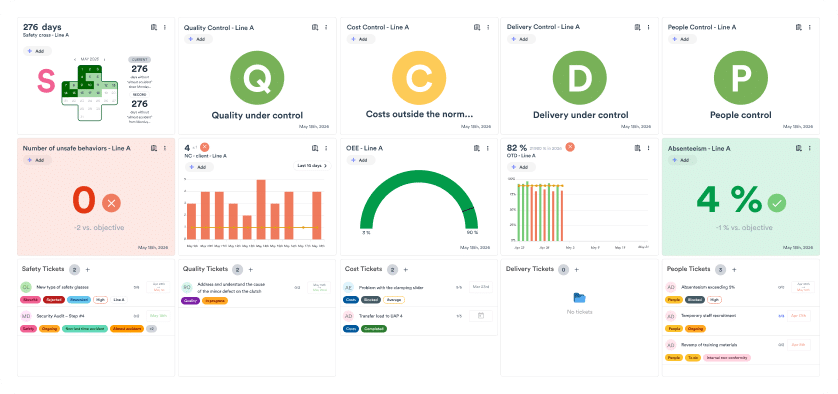
That’s why the evolution from physical to digital SQCDP should be about more than replacing a whiteboard with a screen. A connected Digital Daily Management System can bring together SQCDP dashboards, operational data, tiered meetings, issues and actions so teams can move more quickly from identifying a deviation to resolving it.
Fabriq, a Digital Daily Management System, enables manufacturers to connect performance data with daily meetings, action tracking, problem solving and operational routines across teams and plants. Instead of a standalone, static and manual SQCDP dashboard, Fabriq connects the information manufacturers already have with the people responsible for acting on it. This gives frontline teams a practical daily management tool while providing plant and operational leaders with greater visibility across their operations.
Discover how Fabriq can help you move from static, manual SQCDP boards to digital SQCDP within a connected daily management.

SQCDP in Practice FAQs
What does SQCDP stand for?
SQCDP stands for Safety, Quality, Cost, Delivery, and People. It is a visual management framework used in manufacturing to monitor these five core areas of operational performance.
What is an SQCDP board used for?
An SQCDP board provides frontline teams with a visual way to review daily KPIs, identify performance deviations from expected standards, and take immediate, collaborative action to resolve issues.
What is the difference between a physical and a digital SQCDP board?
While physical whiteboards are highly visible and simple for single teams, they can be difficult to scale across multiple shifts or plants. Digital SQCDP boards offer the same visual management benefits but add capabilities like automatic KPI updates, historical performance tracking, automated escalation, and cross-site visibility.
How do you run an effective SQCDP meeting?
An effective SQCDP meeting follows a five-step structure:
- Review performance against targets;
- Focus on exceptions or abnormalities;
- Understand the problem (root cause);
- Define clear actions with assigned owners; and
- Escalate issues that the team cannot resolve locally.
How does SQCDP integrate with a Daily Management System (DMS)?
SQCDP is a core visual framework within a broader Daily Management System. A DMS connects these SQCDP dashboards with tiered meetings, escalation pathways, and structured problem-solving routines, ensuring that performance data is consistently translated into operational decisions from the frontline to plant leadership.